
Data catalogs have played a fundamental role in solidifying Data Management and Data Governance practices for years. And, with the increased focus on (business) context to feed AI agents, we can only expect these data catalogs to become even more prolific. While there are numerous commercial offerings and open source alternatives, that vary vastly in terms of functionality, all data catalogs offer a means to store metadata about data assets. This technical metadata is often ingested by connecting the data catalog to the data source and simply scanning the schema information. However, when this is not possible due to network or security constraints we end up in a more complex situation.
For one of our clients we were tasked with the ingestion of the metadata for several data sources into Microsoft Purview, a service provided on the Azure cloud. As our client was just starting the process of migrating its application databases to the cloud, most applications were still running on on-premise databases. Purview offers the possibility to ingest the metadata of the data source through the Self Hosted Integration Runtime (SHIR); while there are some considerations to take into account, this solves the issue for on-premise data sources in some cases.
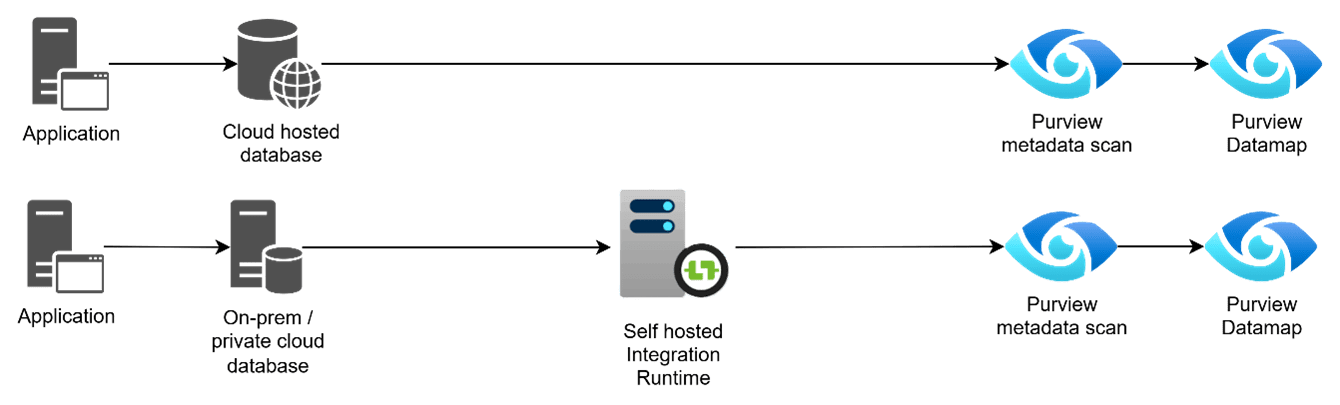
In our situation however, the client is a governmental organization that handles very delicate personally identifiable information. Security is a major concern and often private endpoints are used; the connection between Purview and the data source became very complicated and sometimes impossible even when using SHIRs.
In order to counter these issues, we began to look into different methods of ingesting the metadata. As with most other data catalogs, Purview offers an API to interact with it programmatically. The API is based on Apache Atlas v2 and has a Python SDK; besides several third party libraries on Github such as PyApacheAtlas that make it easier to work with. Having a method to populate the data catalog without scanning is just part of the solution. Getting the metadata to populate the data catalog is the first step. Then, transforming the metadata into something that we can easily use with the API, is the major challenge.
We established direct communication with the database administrators responsible for the business applications, who provided Data Definition Language scripts (DDL) for the corresponding data sources. This DDL script contained the available technical metadata for the schemas, tables, columns, etc. but in order to use it together with the API it must be transformed into a structured format.
Our solution was to build a Python based parser that takes these DDL scripts as input and return an Excel or .csv file that contains all the required information. We created this output file to be in accordance with the PyApacheAtlas SDK to be as business-friendly as possible. This way, more technically savvy data stewards can review the to-be-uploaded metadata and make changes or enrich it.

Apart from circumventing the connectivity issues this approach provides several added benefits: metadata enrichment, bulk modification and metadata filtering.
Surprisingly, not all data assets in Purview contain the same type / amount of metadata. For some data source types things like Primary and Foreign Key information is recorded, while for others it is not (even including Microsoft’s own SQL Server). While this is an obvious weakness to Purview, it can be mitigated by including the key information in the description of the table and/or column. Through our parser, this key information can be taken from the DDL and added to the Excel file, thereby correcting the missing metadata.
Bulk modification is offered partially by Purview; the portal allows for the selection of multiple assets and lets the user make changes to some of their attributes. This implementation is far from ideal, with either a lot of manual effort, or the lack of possibility to update some of those attributes . By doing this through the API with the Excel workaround, we remove the need to manually select and modify in the web interface, providing users with a way of significantly increasing their throughput.
Metadata filtering is another significant benefit of ingesting through the API. When scanning a data source using the (Self Hosted) Integration Runtime, Purview offers very little options to select which tables or schemas should be omitted. This leads to swamping of the data catalog making it hard to find the right (meta)data, which contradicts the reason for implementing it to begin with. With the API, we can easily filter out which schemas, tables, or any other data asset we want to upload to the data catalog and which ones are not relevant.
The benefits of using the parser and the API are not limited to just ingestion; we can also leverage it for bulk enrichment of assets that have been ingested through (SH)IR scanning. A potential reason to use the default scanning rather than the API is that the new Purview Unified Catalog (which we could discuss in multiple articles by itself) enables Data Quality checking of data assets. But since there needs to be a direct connection between Purview and the data source for that to work, registering and scanning the data source is highly preferred. By combining the use of the (SH)IR, the parser and the API, we can manage our data catalog in a much more efficient and effective way.

Conclusion
Populating Microsoft Purview with metadata from secure, on-premise data sources can be impossible when strict security policies prevent direct connectivity, even with a Self-Hosted Integration Runtime. The solution leverages Purview’s API by using a custom Python parser to convert database DDL scripts into business-friendly Excel files. This “offline” method of metadata extraction and ingestion successfully bypasses connectivity challenges while providing added benefits. These include the ability to enrich metadata by adding information not captured by default scans (e.g., primary/foreign keys), perform bulk updates more efficiently than the UI allows, and selectively filter which assets are ingested to maintain a clean and relevant data catalog. This API-based workflow complements standard scanning, offering a hybrid model for more effective and secure data governance.